Function calls are where a voice agent stops feeling like a conversation and starts feeling like a phone tree. The LLM decides it needs a lookup. Your backend fires. And for the next 400 to 3,000 milliseconds the caller is sitting in dead air, listening for a person, or worse, listening to a "let me check" filler that only starts playing after the API has already returned.
Most voice-agent test suites cover the happy path of a tool call: the intent triggered the function, the function returned the right value, the agent said something useful with the result. That is the easy part. The failures live in the timing and the edges: what happens when the tool takes four seconds, what happens when it times out, what happens when the caller interrupts the filler, what happens when the agent retries into a loop. This post is a playbook for testing those.
Why tool calls dominate perceived latency
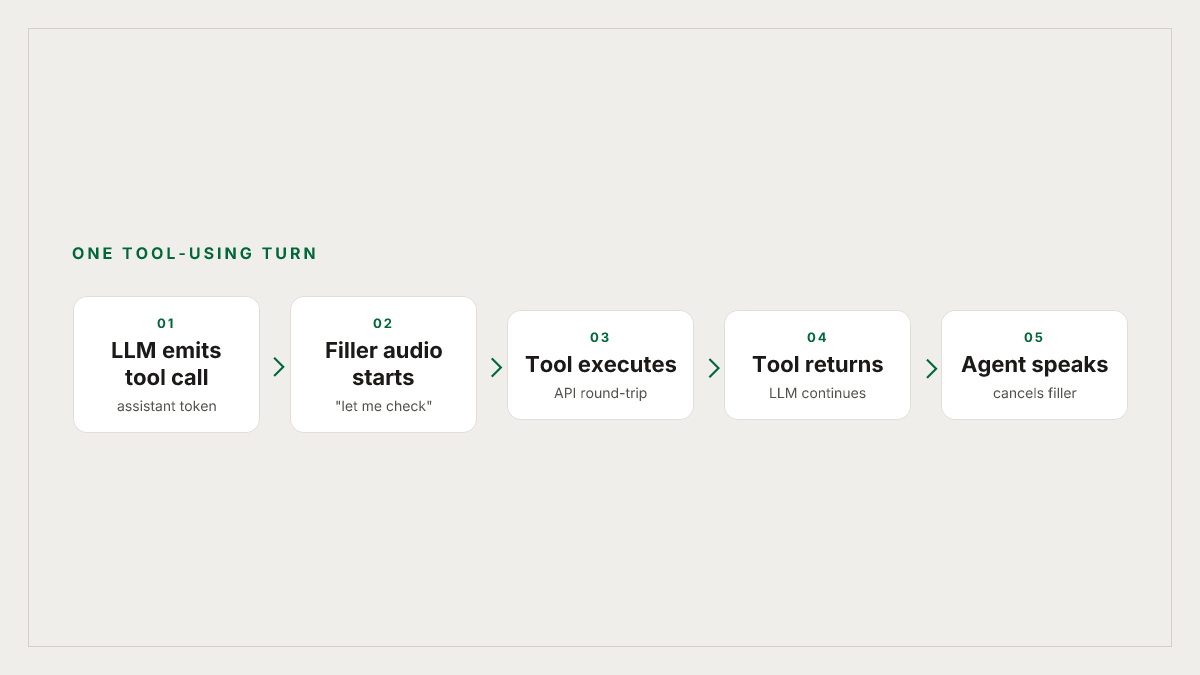
Every function call bolted onto a voice agent stretches one caller turn into a longer critical path. As OnCallClerk breaks it down, a tool-using turn runs LLM-1, then tool call, then tool execution, then LLM-2, then response: two LLM round-trips plus whatever the tool itself does. If the tool hits a slow database or a third-party API, that time compounds.
The LiveKit team's guide to agent latency points at the same problem from the framework side. External calls sit inside function tools, and the time your tool takes has direct and cumulative impact on caller-perceived latency. Their two mitigations, capping max_tool_steps and playing a "thinking" sound while the tool runs, only work if you have actually verified that they fire when you expect. Neither is testable from a transcript alone.
The rule of thumb humans use: Cresta writes that pauses even around 300 ms start to feel unnatural, and anything past roughly 1.5 seconds degrades the experience quickly. Your tool call has to happen inside that budget or your agent sounds broken.
The failure modes a happy-path test never catches
A tool-call test that only asserts "the function returned the right value" is checking a text contract. Voice UX is an audio contract. These are the classes that break in production and never show up in the JSON.
Dead air during execution. The tool is running, the LLM is waiting for the tool result before generating its next tokens, and the caller hears nothing. AutoInterviewAI describes the anti-pattern bluntly: when the LLM emits a tool-call token, a naive orchestrator pauses the audio pipeline while the request goes out and comes back. The caller listens to static.
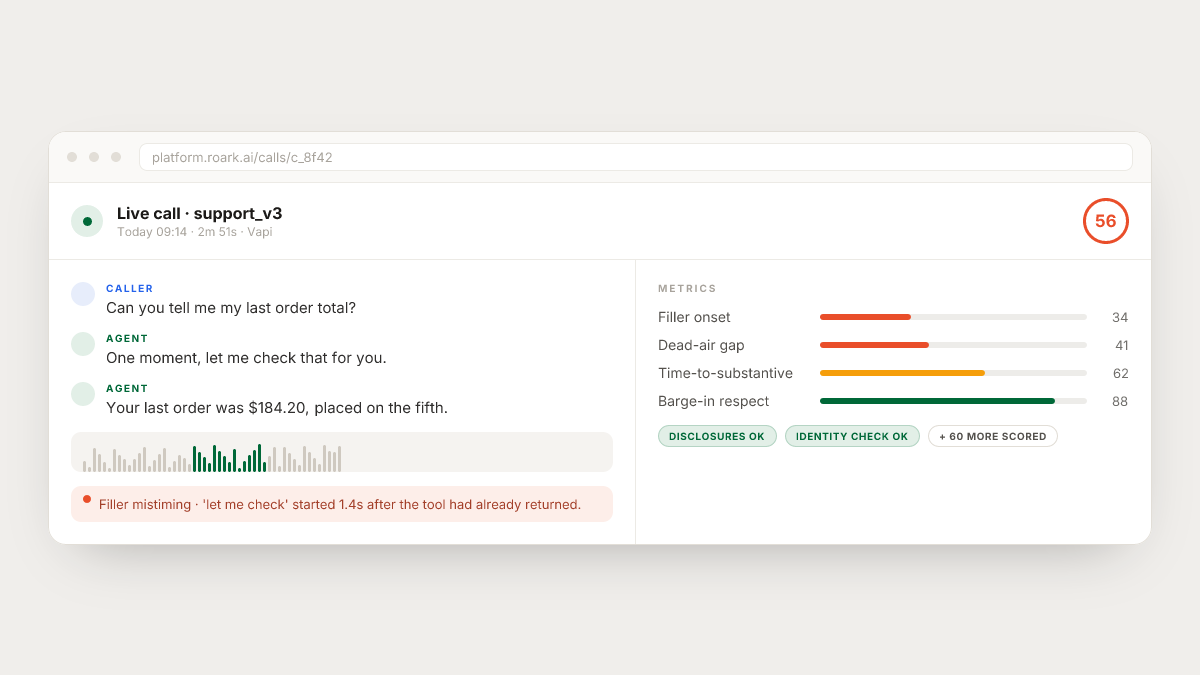
Filler that plays at the wrong time. The intended behavior is that a phrase like "let me check that for you" starts playing the instant the tool call fires, and gets truncated when the real response is ready. The reality, as we wrote in our Retell testing guide, is a subtle failure where the filler plays after the tool has already returned, so the caller hears "one moment please" and then, redundantly, the answer they were already waiting for.
Interruption during the filler. The caller hears "let me look that up" and immediately says "actually, forget it, I need billing." Does the agent stop the filler, cancel the in-flight tool call, and reroute? Or does it finish the filler, wait for the stale tool result, and then answer a question the caller has already retracted?
Tool timeout, no graceful recovery. The tool takes longer than the platform's timeout budget. What does the agent say? Vapi exposes a transferPlan.timeout on transfer tools per its June 2025 changelog, but the equivalent on custom tools is a per-implementation decision. If you have not tested the tool-timeout path, you do not know whether the agent apologizes, retries silently, or hangs.
Retry loops. The tool returns a 500. The agent tries again. And again. LiveKit's max_tool_steps cap exists specifically to prevent this class of runaway, but a cap is only useful if it is actually configured and you have verified the caller-facing behavior when it is hit.
Parallel tool calls that race. Modern LLMs can emit multiple tool calls in one step. If two functions run in parallel and one is fast, one is slow, does the agent wait for both before speaking, or does it speak with partial results?
Speculative execution that fires wrong. The pattern of pre-firing a tool while the caller is still speaking (described in the AutoInterviewAI piece as speculative execution against the streaming transcript) trades latency for occasional wasted calls. If the caller changes direction mid-sentence, does the agent quietly discard the wrong result, or does it awkwardly volunteer the answer to the retracted question?
None of these show up in a unit test on the tool handler. All of them show up in production, and callers hang up on them.
The scenarios your suite needs
A useful tool-call test suite is a small set of scenarios, each aimed at one of the failure classes above, dialed against your agent over a real phone connection. Text simulation misses this class of failure entirely because dead air, filler timing, and barge-in are only meaningful on a media stream.
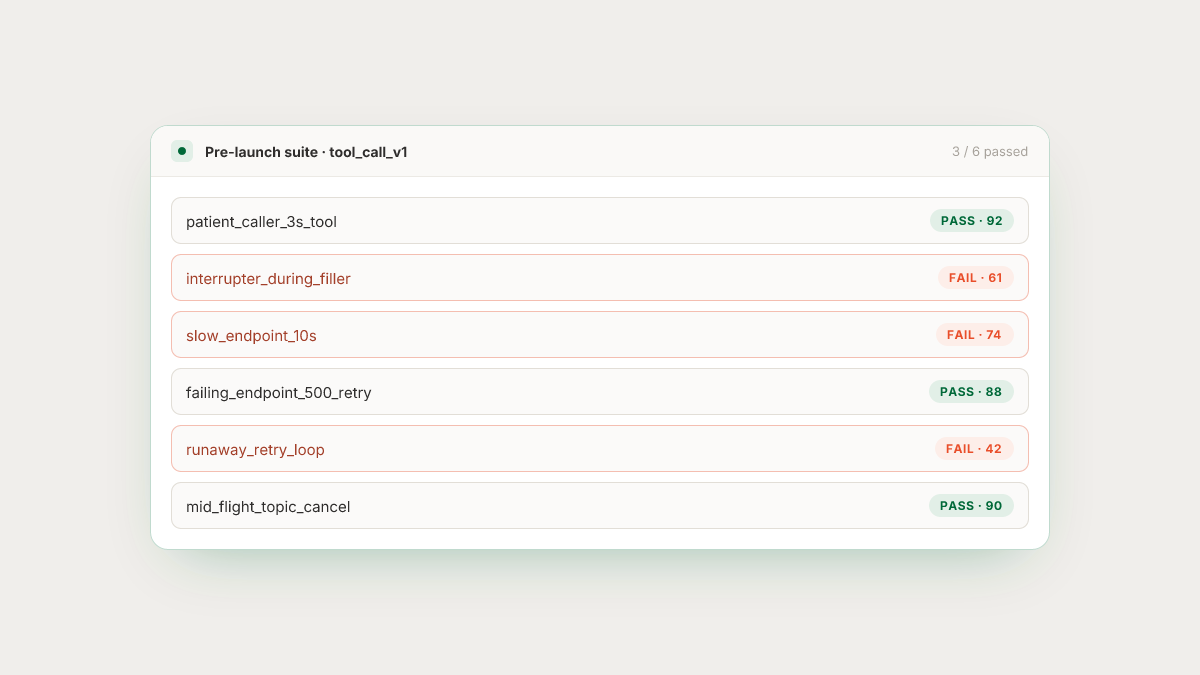
- The patient caller. Persona stays silent during tool execution. Asserts: filler audio starts within a target window (say, 500 ms after tool invocation), and no dead-air gap exceeds a threshold. This is the scenario that surfaces mistimed fillers most reliably.
- The interrupter. Persona speaks over the filler within 300 ms of it starting. Asserts: the agent stops the filler, cancels or ignores the in-flight tool result, and responds to the new input.
- The slow endpoint. Point the agent at a test tool endpoint that intentionally sleeps for 3, 6, and 10 seconds. Asserts: at each duration, the agent's caller-facing behavior is what you specified. Silent hang? Escalation? Retry then apology?
- The failing endpoint. Test tool returns 500 on the first call and succeeds on retry. Asserts: retry policy is what you configured, and the caller experience during the retry is acceptable.
- The looping failure. Endpoint always returns 500. Asserts:
max_tool_stepsor your equivalent guardrail triggers, and the agent recovers gracefully instead of looping until the max call duration. - The parallel pair. Trigger a turn where the LLM should emit two tool calls (weather plus calendar, or lookup plus create). Assert on the ordering, and on the choice to speak with partial results versus wait.
- The mid-flight cancel. Caller changes topic while a tool is executing. Assert the agent abandons the stale call cleanly.
Each of these needs to run on a schedule, not as a one-time smoke test. Model routing, provider queue time, and telephony behavior all drift, and a suite that only ran the day you launched is not catching yesterday's regression.
The metrics worth scoring
The metrics that matter on tool-call testing are timing metrics, not content metrics. A partial list:
- Time from tool invocation to first filler audio. If this is over a few hundred milliseconds, the filler is not doing its job.
- Time from tool completion to next meaningful agent utterance. Distinct from the filler start. Dasha's latency writeup makes the case for tracking time-to-substantive-response separately from time-to-first-audio, precisely so a snappy filler cannot mask a slow answer.
- Dead-air duration. The longest gap between agent audio segments during a tool-using turn. Should be near zero once fillers are working.
- Filler overlap on tool completion. Whether the filler is still playing when the actual response is ready: the moment the agent has to decide whether to interrupt itself.
- Retry count on failure. How many times the LLM attempted the tool before giving up.
- Barge-in respect during filler. Whether the agent honored an interruption while the filler was playing.
- Recovery quality on timeout. A separate rubric metric: did the agent apologize, escalate, offer a callback, or just hang up?
Each of these is easy to score once you are actually listening to the call audio. None of them are visible if you are only diffing transcripts.
Building the adversarial tool
The trick that makes all of this testable is a stub endpoint you control. Nothing in your production tool stack lets you say "return in 8 seconds" or "500 the first two calls, then succeed." You need a tiny HTTP service, deployed anywhere, that reads query parameters and behaves accordingly: ?sleep_ms=8000, ?fail_count=2, ?status=500.
Wire that stub in as one of your agent's tools in a staging config, alongside the production tools. Now every scenario in the suite above is expressible as a persona plus a stub-endpoint configuration. Slow-endpoint tests set sleep_ms. Failing-endpoint tests set fail_count. Looping tests set status=500 with no recovery. The agent side of the code path is identical to production, which is the whole point.
Where Roark fits
Testing this class of failure is what Roark is built for. Simulation runs dial your agent over real PSTN or WebRTC, so the media path is real and the dead-air and filler-mistiming failures actually appear the way they do in production, not the way they show up in a text loopback. Personas can be scripted to stay silent, to interrupt at a specified moment, or to reverse course mid-sentence, which is what the scenarios in this post need.
The scoring is audio-native. Roark ships 64+ built-in metrics plus a custom-metric layer, and the timing measurements above (filler onset, dead-air duration, time-to-substantive-response) live natively at the audio layer rather than being reconstructed from transcripts after the fact. When a run breaks a metric, an issue is filed automatically on the call it broke on, with the transcript and audio pinned to the moment of failure.
Roark also captures your real production calls and lets you replay them against updated agent logic, so the actual four-second lookup that broke a live call last Tuesday becomes a permanent test case, not a hallway anecdote. The one-click integrations cover Vapi, Retell, LiveKit, Pipecat, Bland, and ElevenLabs, which is the surface most tool-calling voice agents live on today.
A test you can build this week
If you have none of this in place today, start with one scenario and one metric. Stand up a stub endpoint that sleeps for 3 seconds and returns a hardcoded payload. Point one of your agent's real tools at it in a staging config. Run a simulated call where the caller asks the question that triggers that tool, then stays silent. Measure dead-air duration between the start of the tool call and the first audio the caller hears.
If the number surprises you, you have found the bug your next release would have shipped. Add the interrupter scenario, then the 500-loop scenario, and you are already ahead of every team that treats tool calls as a text contract.
The tool call is where a voice agent stops being a voice agent and becomes a request-response loop with a microphone. Test it like an audio experience, because that is what the caller hears.