Your agent's latency chart looks clean. Barge-in triggers at 90ms in the lab, the ASR hits 4% WER on your eval set, the LLM comes back in 400ms. You ship. The first wave of real calls shows an agent that talks over callers mid-sentence, hears "yes" when they said "fifteen," and silently branches into the wrong flow before anyone catches it.
The culprit is almost never in your code. It is that your test rig evaluated the agent on a clean WebRTC loopback while most of your production traffic comes in over cellular and SIP trunks with real packet loss, real jitter, and real codec transcoding. The network layer is where most "unreproducible" voice agent bugs actually live, and it is where almost no pre-launch suite spends any time. The release of Microsoft's MAI-Transcribe-2-Streaming earlier this month is a good reminder: a new streaming ASR looks great on your clean test audio and still ships regressions the moment it meets cellular loss.
This post is about building that network layer into your pre-launch suite, and watching for it in production once you have.
Why the lab lies to you
The ITU-T G.114 recommendation has set the ceiling for acceptable one-way voice delay at 150 ms for most user applications for over three decades, with the 150 to 400 ms range marked as degraded and above 400 ms unacceptable. For a two-way voice agent, where every turn pays the ASR + LLM + TTS round-trip on top of transport delay, that ceiling is unforgiving. The caller's cellular jitter buffer and your agent's compounding processing time share the same 150 ms budget.
The accuracy picture is just as stark. Deepgram's own research puts accuracy degradation between controlled benchmark conditions and production telephony environments at 2.8x to 5.7x, citing clinical ASR studies where WER rises from under 9% in dictation to over 50% in conversational speech. Narrowband 8 kHz telephony alone adds 8 to 12% absolute WER over a wideband baseline, before you factor in loss. And when the network itself degrades, a peer-reviewed evaluation found a clean-speech-trained ASR starts seeing WER rise proportionally once packet loss exceeds 10%, with the combined effect of jitter and loss compounding on top of that.
None of this shows up in a pytest run that pipes a 16 kHz studio-recorded WAV into your agent.
What packet loss and jitter actually do to a voice agent
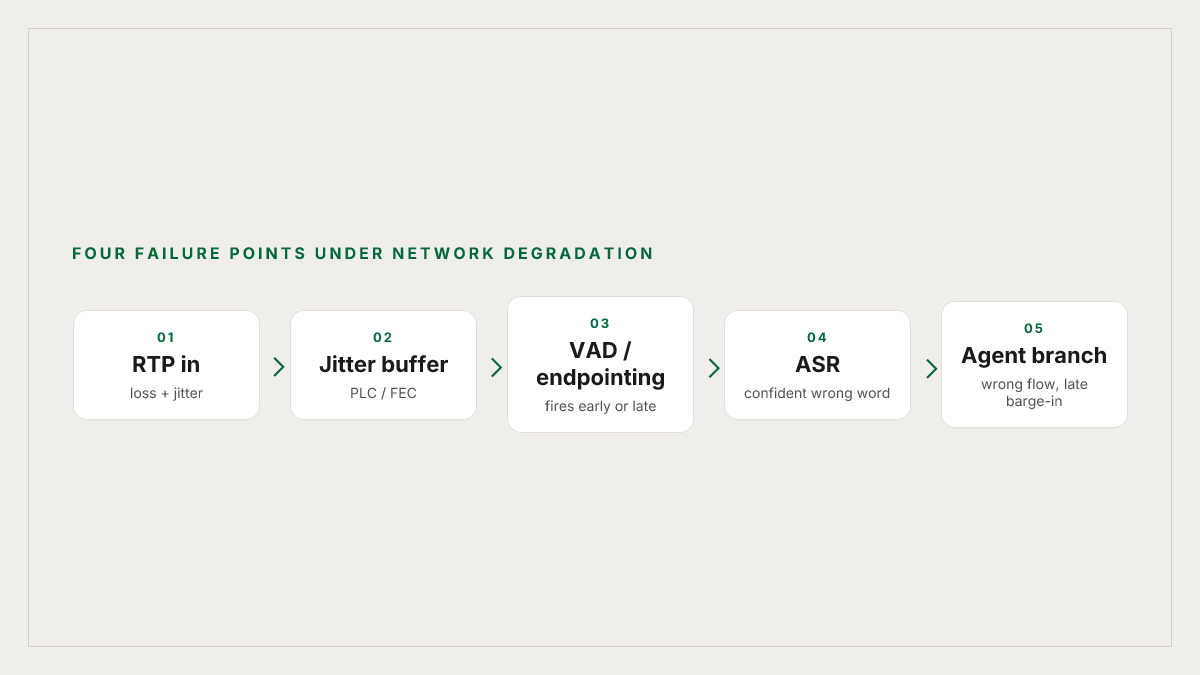
There are four places where network degradation breaks a voice agent, and they fail in different ways.
1. ASR acoustic input. A dropped RTP packet is 20 ms of zeroed audio reaching the recognizer. Even with concealment active, the acoustic model sees a different signal than the one the caller spoke, and the frontier research is clear that this sharply lowers accuracy. The failure mode is not "the ASR errors out." It is that the ASR confidently returns a wrong word, and your LLM happily routes on it.
2. VAD and endpointing. Voice activity detection decides when the caller stopped talking. Packet loss concealment fills silent gaps with generated audio that approximates the pitch and spectrum of recent frames. To the VAD, a concealed frame can look enough like speech to delay endpointing, or enough like noise to trigger early. Either way, your turn-taking goes sideways. Deepgram's own documentation calls out that end-of-speech detection fails when background conditions hide silence gaps, and PLC-filled audio behaves the same way.
3. Barge-in detection. If the caller interrupts and the first packet carrying their "wait" is dropped, your agent keeps talking for another 60 to 120 ms until the next packet makes it through. In a quiet lab that gap is invisible. On a bad cellular handoff it is the difference between a natural interruption and the caller yelling at a bot that is still reciting disclosures.
4. TTS cutoff and interruption cancel. The same lag that delays detection delays cancellation. By the time your pipeline has decided the caller is speaking and told TTS to stop, the audio buffer is already a second ahead and the caller hears a trailing fragment that collides with their own words.
Opus hides a lot. Then your SIP trunk undoes it.
If your agent runs end-to-end over WebRTC, you benefit from one of the best packet-loss recovery stories in codec history. Opus combines SILK and CELT, and in all modes it supports packet loss concealment, with the SILK speech modes also supporting Forward Error Correction where critical frames can be retransmitted at low bitrate to preserve intelligibility. The mechanic is simple: when the encoder thinks the network is lossy, it tucks a low-quality copy of the previous packet's audio inside the current packet, so if packet 5 is lost, packet 6 reconstructs it. The libopus 1.5.1 release added Deep PLC and Deep Redundancy (DRED) for further robustness to lossy conditions.
Then your agent talks to a caller on a phone number. The call hits a SIP trunk, gets transcoded to G.711 narrowband, and every Opus-era protection evaporates. G.711 has no FEC and only basic PLC, and the extra transcoding step adds its own delay and quality cost. If your platform is Vapi, Retell, or Twilio terminating over PSTN, this is the audio path that matters, not whatever happens on the WebRTC leg to your dashboard.
The practical consequence: tests that only exercise the WebRTC path overestimate your agent's robustness by a wide margin. You have to test the PSTN path directly.
Three injection points for degraded network testing
Pre-launch testing for network degradation has to inject at the right layer, and there are only three that are worth doing.
Codec and RTP layer injection. Drop RTP packets and vary inter-arrival times before they reach the receiving jitter buffer. This is what you do to isolate ASR behavior under loss. Useful when you are comparing two ASR vendors or validating a new streaming model, but not representative of the whole stack.
Transport layer injection. Use tc and netem on the test host to apply loss, delay, jitter, and burst patterns to the whole socket. This catches end-to-end effects (jitter buffer, PLC, endpointing) in a way RTP-only injection does not. It is still a lab, but it is a more honest one.
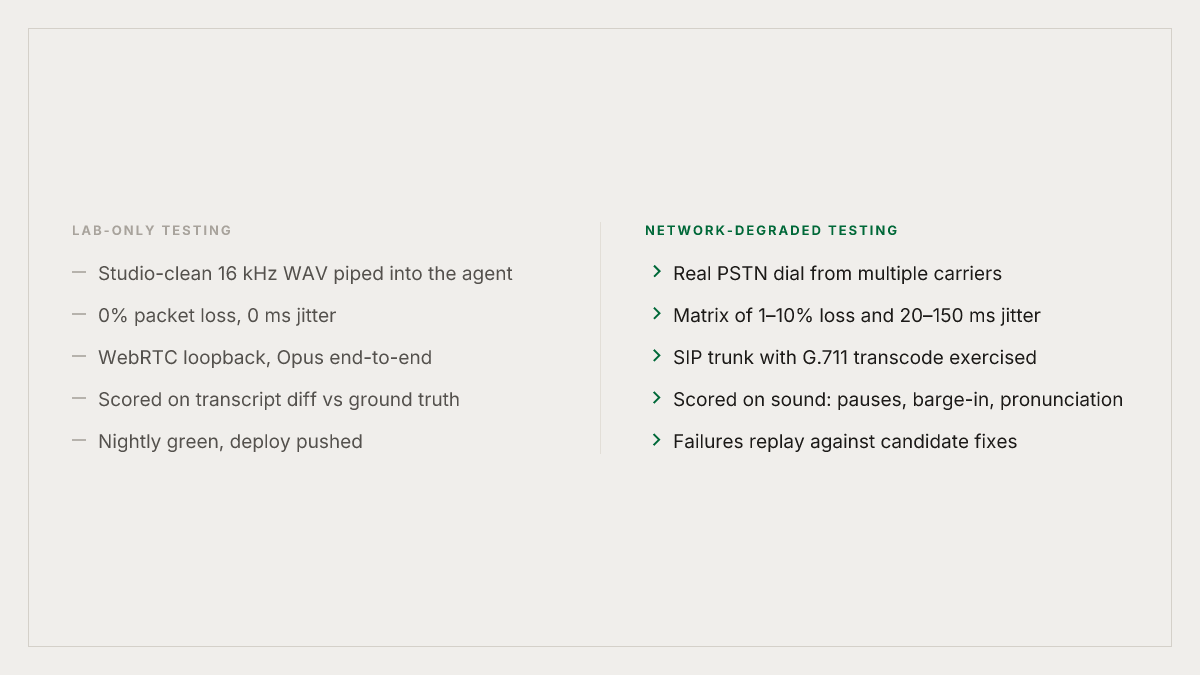
Real telephony dialing. Dial your agent over real PSTN from multiple carriers and regions. This is the only way to catch the actual codec negotiation, the actual jitter and loss profiles your callers experience, and the behavior of your SIP termination provider under real conditions. Everything else is a model of this, and a model is a model.
The matrix you want to run is small and well-defined:
| Dimension | Buckets |
|---|---|
| Packet loss | 0%, 1%, 3%, 5%, 10% random; 100 ms burst |
| Jitter | 20 ms, 50 ms, 100 ms, 150 ms |
| Codec path | WebRTC Opus end-to-end, SIP trunk with G.711 transcode |
| Scenario | Each production flow (auth, booking, transfer, FNOL, etc.) |
Twenty flows times five loss profiles times four jitter buckets times two codec paths is 800 calls. Run it nightly, not once at launch. The point is not to pass every cell; the point is to know which cells fail so you can decide whether to fix the agent, change the provider, or set a different expectation.
What to score, and why text metrics are not enough
Transcript-level metrics will miss most of the damage. If your eval only compares the ASR transcript to a ground-truth text, you will catch word substitutions but not any of the following:
- Dead-air events where the agent paused for 3 seconds while PLC filled the input.
- Barge-in misses where the caller interrupted and the agent kept talking for another second.
- Pronunciation drift where TTS mispronounced a reconstructed name under network back-pressure.
- Pace and prosody breakdowns where the agent's cadence became visibly robotic under load.
These are audio-native failures. They need to be scored against the actual sound, not a transcript of it. In practice that means you need a scorer that listens to the recording, locates the dead air, measures the latency from caller onset to agent cancel, and judges pronunciation and emotion over the waveform. A transcript-based rubric cannot do any of this.
Where Roark fits
Pre-launch simulation under realistic network conditions is exactly what Roark is built for. Roark's simulation testing dials your agent over real PSTN and WebRTC, so the audio path your agent sees in a sim is the audio path a caller sees in production, including the codec negotiation, the carrier jitter, and the SIP trunk behavior you cannot reproduce in a loopback. Personas vary the caller's voice, accent, pace, and background noise environment, so the ASR is working against the same distribution of inputs that will hit it in production, not a studio-clean baseline.
Every live call is then scored on audio-native metrics that look at the sound of the call (pronunciation, pace, pauses, interruptions, emotional register) and not just the transcript. When loss on a particular call triggers a mishear or a dead-air stretch, the issue is filed automatically against the metric that failed, and the call is one click away from being replayed against a candidate fix via Roark's production call replay. The failure becomes a regression test, not a Slack message with "weird one, can't reproduce."
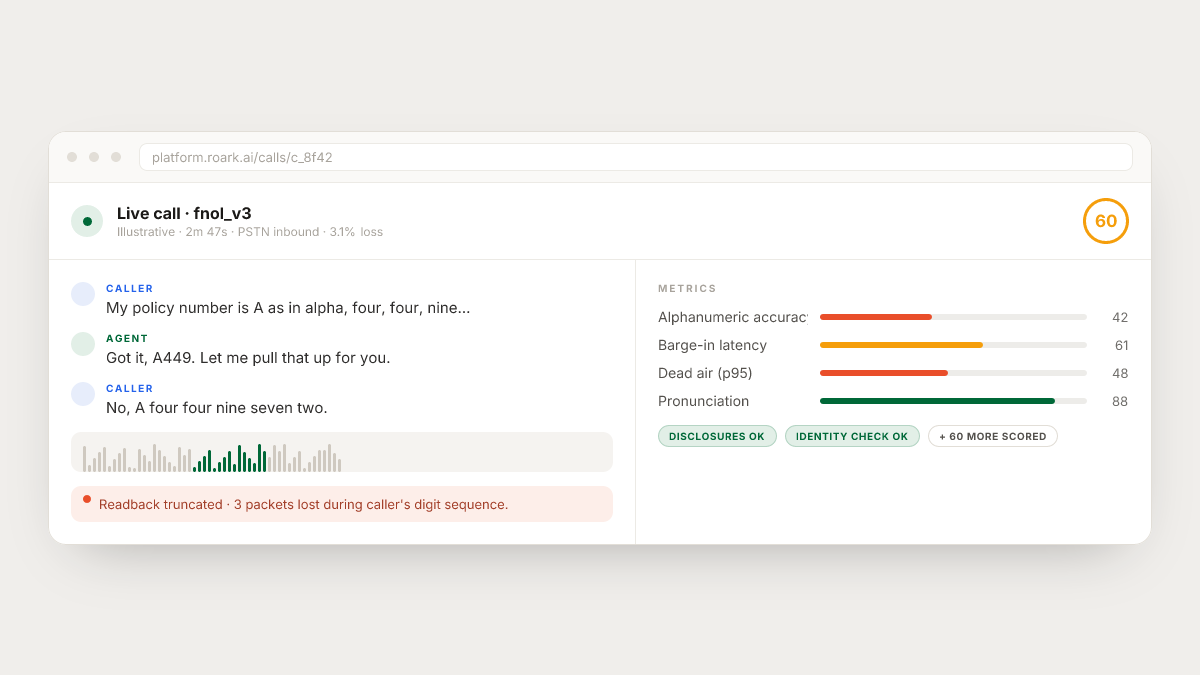
The one-click integrations with Vapi, Retell, LiveKit, Pipecat, Bland, and ElevenLabs mean you are not writing a harness; you point Roark at your agent and the inbound or outbound dialer takes over. For CI, runs can be triggered automatically over HTTP so a pull request to your agent repo gates on the degraded-network suite the same way it gates on unit tests.
A pragmatic rollout
If you are starting from zero, do not try to build the whole 800-call matrix on day one. Three steps get most of the value:
- Record a baseline over PSTN. Dial your agent on its production number from a cellular connection, run your top five flows, and score the recordings on audio-native metrics (pronunciation, pace, interruptions, dead air). This is your "actual" number. It will be worse than your lab number.
- Inject one dimension at a time. Start with 3% random loss across your top flows and watch where the failures cluster. Most teams find they are losing on one or two specific turns (an alphanumeric readback, a long disclosure) rather than uniformly.
- Make it recurring. Schedule the suite nightly against your staging agent and gate deploys on it. The first time a model update, a provider switch, or a TTS voice change regresses the degraded-network score, you will have caught something that would otherwise have landed on real calls.
The teams that do this stop having "cellular callers hate the bot" as a recurring postmortem theme. The ones that do not keep shipping agents that look great on the dashboard and sound bad on the phone.
The honest summary
Clean-path testing is necessary and insufficient. Opus FEC and modern PLC do a remarkable amount of work, and then your SIP trunk strips most of it and your caller's cellular handoff finishes the job. The agent that passed every lab test is the one that mishears, interrupts, and drops into the wrong branch on the calls that pay your bills.
Build the degraded-network layer into your pre-launch suite, score every production call on how it actually sounded (not just what the transcript said), and treat the failures as regressions you can replay. That is the loop that gets a voice agent to the point where its live metrics track its lab metrics, instead of embarrassing them.