Answering-machine detection is the piece of your outbound voice agent nobody thinks about until it burns a week of dial minutes leaving half-messages to humans. It sits before the first LLM token, decides which of two disjoint scripts to run, and rides on top of an audio classifier that has to be right in the first three seconds of the call. Get it wrong and every downstream metric, connect rate, cost per pickup, callback rate, is quietly poisoned.
The wrinkle is that "who picked up" stopped being a binary a while ago. A production outbound voice agent in 2026 has to distinguish humans, voicemail greetings, IVR menus, hold music, telecom messages ("your call is being connected"), and now a growing share of carrier-side and OS-level screeners. A LiveKit Agents user running thousands of answered calls per day reports that around 30% of their calls are voicemail or iOS 26 Call Screening bots, a share that has been climbing as more callers turn screening on. If your AMD test plan is still "does it detect voicemail: y/n", you are testing 2019.
Why AMD keeps regressing in production
AMD failures look benign on a dashboard and expensive on the bill. The failure modes:
- False positive on humans. The classifier flags a live caller as voicemail. Best case, your agent hangs up on a lead. Worst case, it launches into a pre-recorded voicemail script and leaves half of it before the human interrupts.
- False negative on voicemail. The classifier misses the greeting. Your agent starts talking as if a human answered, gets cut off by the beep, and the message that lands on voicemail is missing the first ten seconds, including the callback number.
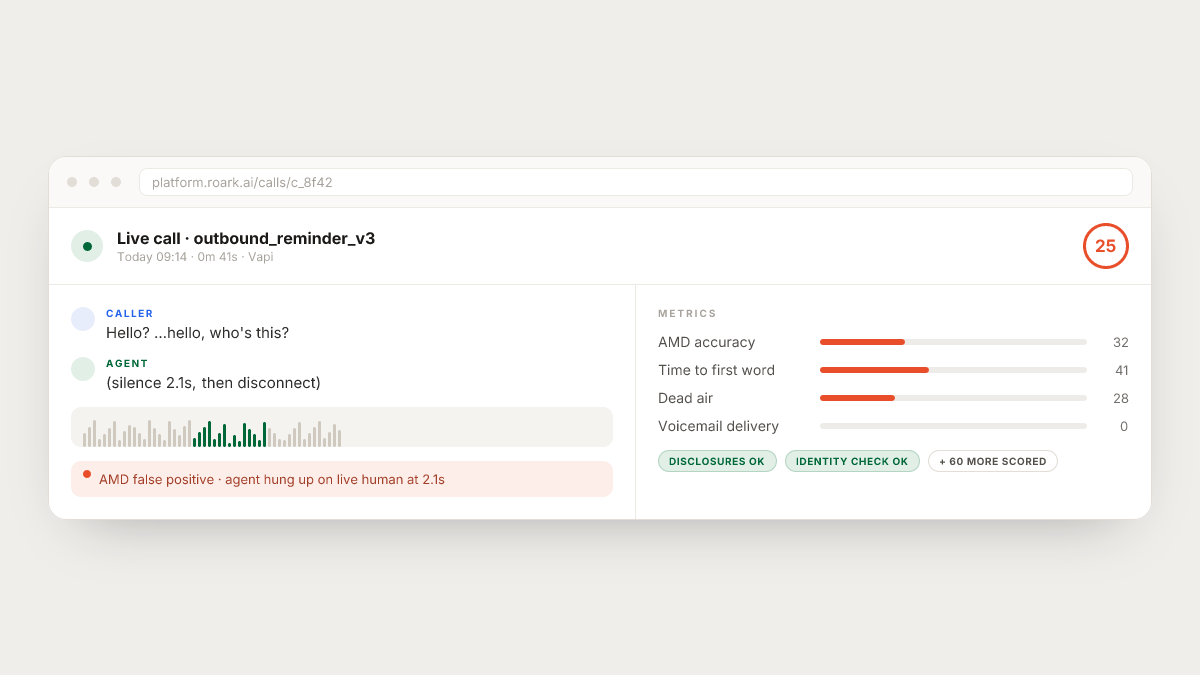
- Slow detection on humans. Classic Twilio AMD introduces multiple seconds of silence while it processes, which is why Twilio itself now positions async AMD as the answer and Vapi's docs flag the legacy Twilio AMD path as such. The human answers and hears nothing for three seconds. Half of them hang up.
- IVR misclassified as voicemail. Your outbound agent is calling a small business whose office phone rolls to an auto-attendant. AMD calls that voicemail, your agent leaves a message into the tree, and nobody ever hears it.
- Screener misclassified as human. iOS 26 Call Screening, Google Pixel's screener, and Truecaller-style bots ask the caller to state the purpose of the call. That prompt sounds like a human greeting to most classifiers. The agent launches into the pitch, the screener transcribes it, and either the caller declines or the entire "conversation" happens with a bot pretending to be a human.
- Language and accent bias. Twilio's docs are explicit that the algorithm uses periods between speech and silence to determine the answering party, and does not always classify correctly across all humans and greetings. "All humans" is doing a lot of work in that sentence. Regional greeting patterns, non-English voicemail systems, and elderly callers with slower cadence all fall outside the training distribution the classifier was built on.
Each of these produces its own downstream damage. And each is invisible unless you specifically test for it.
What "correct" behavior actually looks like
Before you can test AMD, you have to write down the correct behavior for every pickup class, not just human vs. machine. This is the table I use as the acceptance spec on outbound programs:
| Pickup class | Correct agent behavior | Common bug |
|---|---|---|
| Human, immediate hello | Start the conversation within your latency budget | Silence while sync AMD finishes |
| Human, slow "helloooo?" (elderly, noisy line) | Classify as human, still start conversation | Classified as voicemail, agent hangs up |
| Standard voicemail greeting | Wait for the beep, leave pre-generated message with callback | Talks over greeting, message truncated |
| Custom voicemail (long, music, kids talking) | Detect voicemail confidently, still wait for beep | Detects late, leaves partial message |
| IVR / auto-attendant ("press 1 for sales") | Do not leave a message; either navigate or hang up cleanly | Leaves voicemail into a menu |
| iOS 26 / Pixel Call Screening | Briefly state purpose, honor screener timeout, hang up | Full pitch delivered to a bot |
| Telecom hold ("your call is being connected") | Wait, do not speak, retry classification | Starts pitch to a hold announcement |
| No answer, ring-out | Hang up, log as no-answer for retry cadence | Agent stays on the line until max duration |
| Fax tone | Immediate hang up | Long silence until timeout |
If your test plan does not cover every row, your production is running on hope. And note that "leave voicemail" is not a single behavior. Twilio's DetectMessageEnd mode is specifically for waiting until the end of the greeting to trigger the callback, because otherwise your message starts mid-greeting. That is a real config knob you have to test both settings of.
The AMD stack you are actually testing
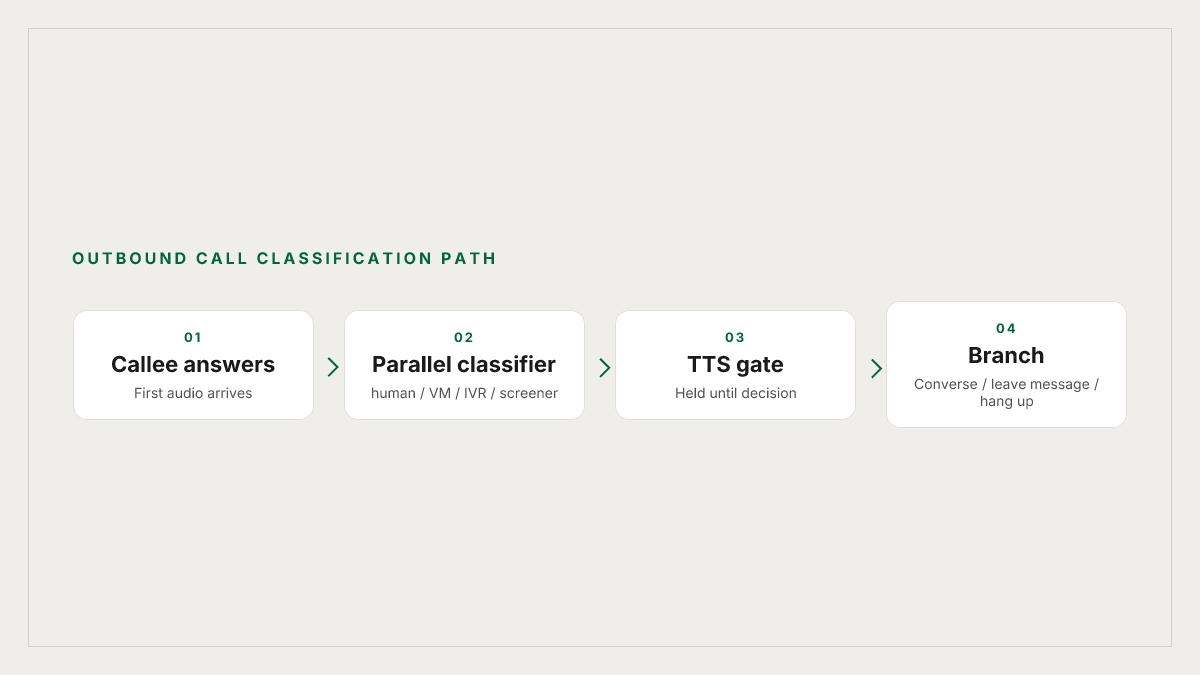
Modern voice-AI platforms have moved past classic DSP-based AMD, but the moving parts multiplied rather than shrunk. On Pipecat, the VoicemailDetector runs a parallel pipeline with a classifier LLM whose only job is to output CONVERSATION or VOICEMAIL, gating TTS output until the decision lands. On Retell, voicemail and IVR detection is a first-class agent setting that runs continuously within a timeout window and the docs claim under 30 ms of added latency. On Vapi, the current recommended path is LLM-based detection via function calling, with the Twilio AMD path marked legacy. LiveKit does not ship a built-in detector, which is why the community request to add one explicitly cites the iOS 26 screening problem.
The consequence: your AMD is now typically a small LLM classification running in parallel with your main conversation LLM, holding TTS in a gate, with a timeout that decides how long you wait before defaulting one way or the other. That is five knobs, not one, and every knob deserves a regression test.
Building a real AMD test plan
Testing AMD by dialing your own cell phone and letting it go to voicemail is not a test plan. It is a smoke check. A real plan looks like this.
1. Enumerate personas, not scenarios
Voicemail detection is a caller-side property. Every test case is defined by "what the called party sounds like in the first ten seconds". You need personas for:
- Fast human greetings ("hello, this is Alex")
- Slow, quiet human greetings
- Humans in noisy environments (kids, TV, cars)
- Non-English humans, at least Spanish, French, Hindi, Mandarin
- Standard carrier voicemail greetings across major US carriers
- Custom voicemail greetings, including musical, comedic, and long ones
- Bilingual voicemail greetings (Spanish then English is common in the US)
- IVR trees: main menu, sub-menu, "please hold" music, "all our agents are busy"
- iOS 26 Call Screening prompt and Pixel Call Screen prompt
- Telecom announcements: "your call is being connected", "your call cannot be completed as dialed"
- Fax tones and SIT tones
Each of these is a persona in the simulation harness, and each gets an expected agent behavior from the acceptance table above.
2. Test over real phone calls, not text transcripts
AMD is an audio problem. If you evaluate the classifier by feeding it strings, you will not catch the classes of failure that actually break production: greeting cadence, background noise, codec artifacts on the PSTN leg, TTS-generated voicemail greetings that sound "too clean". You want the test caller to dial your agent over real telephony (or WebRTC where your agent expects it), play the persona's audio, and let your production stack ingest exactly what it will ingest in production.
This is the reason we built Roark to dial voice agents over PSTN and WebRTC rather than mock the audio. Simulations built from personas, scenarios, and run plans let you cover the whole AMD matrix, in 45 languages and accents, without babysitting a phone. Every persona can carry its own voice, accent, pace, and background noise environment.
3. Score more than "did it detect"
The pass/fail bar for an AMD scenario is a compound assertion:
- The classifier reached the correct label (human / voicemail / IVR / screener / hold / fax).
- It reached it inside the acceptable window (roughly under one second for human, before end-of-greeting for voicemail).
- The agent's behavior on the branch was correct: did it wait for the beep, was the callback number pronounced correctly, did it hang up cleanly on IVR.
- No dead air on the human branch (this is the failure mode async AMD exists to solve).
- On voicemail, the full message was delivered without the first N seconds being clipped.
Every one of these is a metric, and each has its own threshold. This is where audio-native scoring matters: the difference between "leaves a voicemail" and "leaves a voicemail whose first three seconds are cut off" is invisible in the transcript and obvious on the waveform. Roark scores every call on audio-native metrics like pace, pauses, and pronunciation, not just transcript checks, which is what catches "the callback phone number came out as five-five-five, one-two-three, four-five-six-seven" versus mumbled.
4. Wire the tests into CI, not release day
AMD regresses on every change to the voicemail classifier prompt, every LLM version bump, every TTS provider swap, every silence-threshold tune. The rule I use: if it takes a code change or a config change to modify AMD behavior, that change ships behind a green suite.
Roark's simulations can be triggered over HTTP so a CI job kicks off the AMD suite on every PR, and inbound and outbound are both supported. The important part is that "AMD works" becomes a gate, not a vibe check.
5. Replay production failures as regression tests
The AMD failures worth writing tests for are the ones you have already seen. Every time a call in production ends up in the wrong branch, capture the recording and turn it into a fixture. Roark supports exactly this loop: production call replay lets you capture real calls and replay them against updated agent logic, turning yesterday's false positive into a permanent regression test. Do this for a month and your AMD suite starts to reflect your real caller distribution, not a synthetic one.
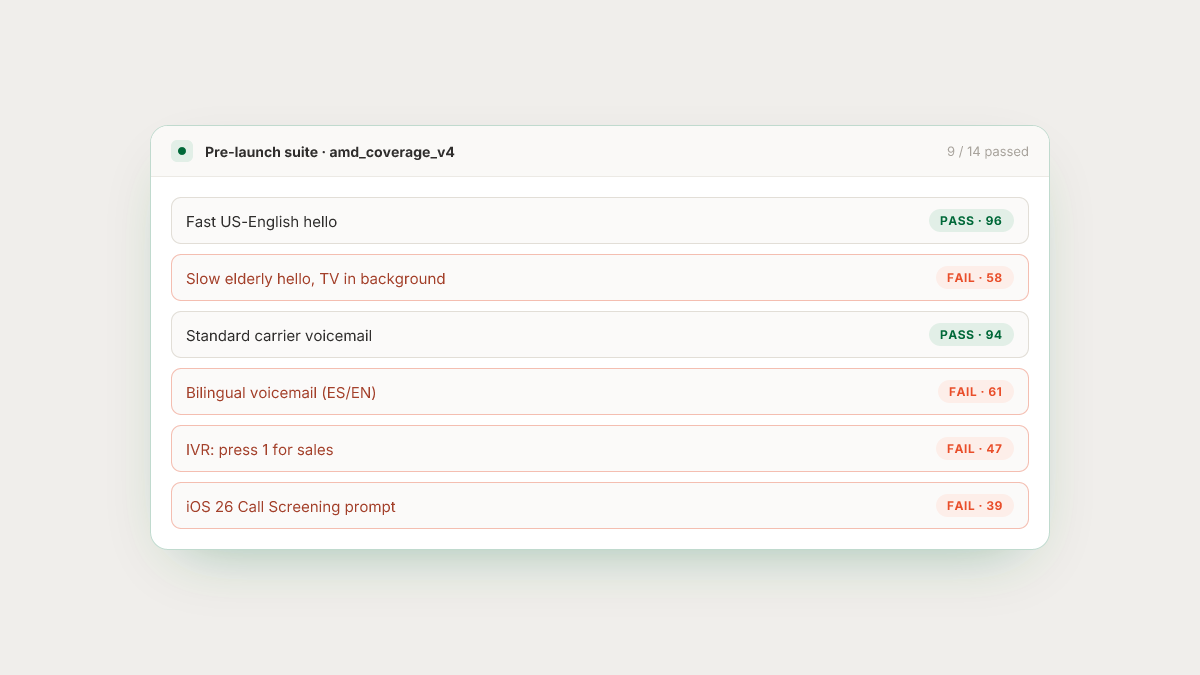
What to score on live traffic
Simulation catches the failures you thought to design for. Live scoring catches the ones you did not. On production outbound traffic you want continuous scores on:
- AMD classification confidence over time. A drop in confidence or a spike in the "unknown" bucket is your leading indicator that the classifier's distribution has shifted (new iOS Call Screening rollout, new carrier greeting format, a Vapi or Retell platform update).
- Time-to-first-agent-word by pickup class. If human-pickup TTFB creeps up, sync AMD is likely back in the loop. Fix it before it hits the answer-rate.
- Voicemail delivery completeness. Score every voicemail branch on whether the intended message was delivered end-to-end. This is the single metric most teams do not have and most need.
- Screener detection rate. Track how often calls end because the caller side matches a Call Screening pattern. If this trends up and your agent does not have screener-specific behavior, you are shipping full pitches to bots.
- Cross-language degradation. If your outbound program crosses languages, watch AMD accuracy per language. This is where the "classifier trained mostly on US English" tax gets billed.
Every one of these is something Roark scores automatically once calls are ingested, with issues filed the moment a call fails a threshold. That is the difference between finding AMD regressions on Monday and finding them in the QBR three weeks later.
The one paragraph version
Outbound voice agents live and die on the first three seconds of the called-party audio. If your test coverage for that window is "we tried a couple of voicemails once", the current wave of Call Screening rollouts, custom greetings, and multilingual voicemail systems is going to eat your connect rate quietly and expensively. Write the acceptance table. Turn each row into a persona. Dial them over real telephony. Score the audio, not the transcript. Replay every production miss into the suite. Gate the branch on green. Then, and only then, are you actually testing AMD.