"Let me check on that" is the most load-bearing sentence in a production voice agent's script. It fills the seven to fifteen seconds when a tool call is waiting on a database, a CRM, or a legacy inventory system. Callers who would have hung up in silence stay on the line because the agent kept talking. Get it right and no one notices. Get it wrong and the collapse is more visible than the dead air you were trying to hide: the phrase fires three times in a row, plays on top of the caller when they try to interrupt, or announces a lookup that never returns.
Frameworks now treat filler audio as a first-class primitive. LiveKit shipped async tools in livekit-agents 1.6 in June so a slow function can keep the agent talking while it runs in the background (LiveKit engineering blog). Vapi exposes filler injection as an orchestration primitive that runs on their infrastructure alongside endpointing and interruption detection (Vapi data-flow docs). And yet the audio behavior around your tool calls is almost never in a QA suite. Prompt evals score the words. Trace dashboards show the durations. Nothing scores what the caller actually hears in the eight seconds between "checking your account" and "here's what I found."
What a filler phrase actually is
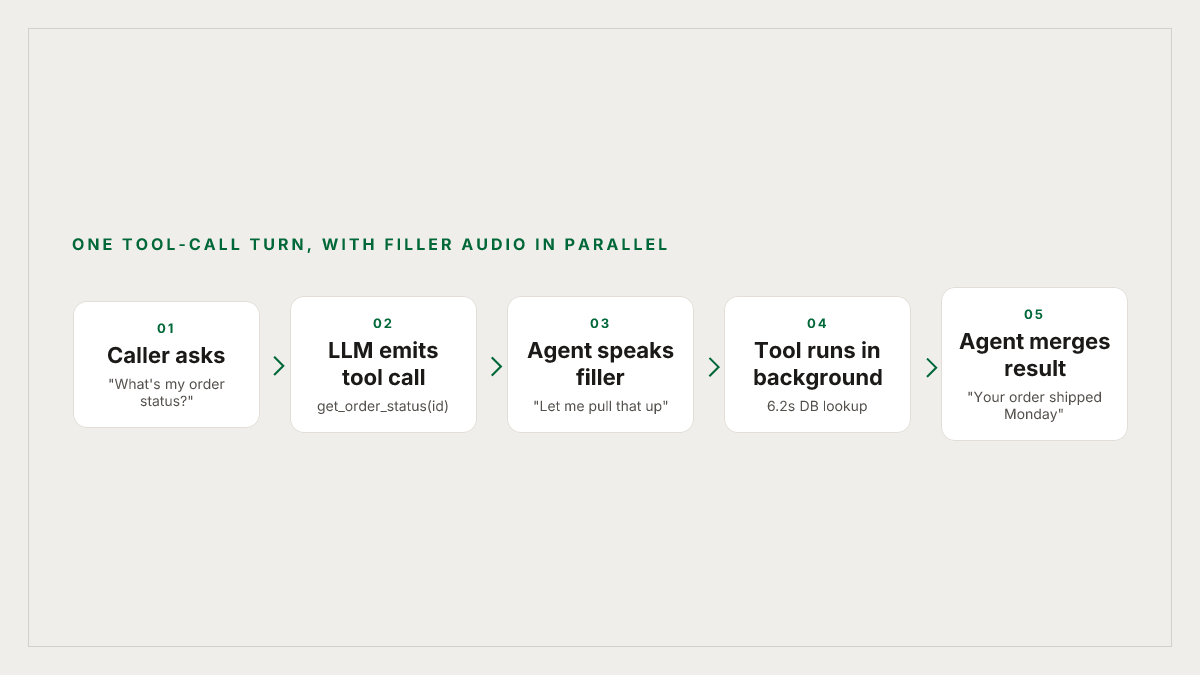
A filler phrase (also called a thinking phrase, interim message, or infill) is a short utterance the agent speaks the moment it decides to invoke a tool, so the caller hears speech instead of silence while the tool runs in a background task. In LiveKit's model, tools can run synchronously or in the background, letting the agent keep talking while long-running work completes. The naive shape without them, straight from LiveKit's own guide, is a customer asks for a refund, the tool takes fifteen seconds, and for those fifteen seconds the agent says nothing.
There are two implementation patterns in the wild:
- Hard-coded per-tool. The framework pairs each slow tool with a fixed utterance ("give me a second while I pull that up") that fires the instant the LLM emits the tool call. The tool executes in parallel behind the audio.
- LLM-narrated. The prompt instructs the model to open its response with a filler when it's about to call a lookup, and the orchestration layer streams the first tokens to TTS while the rest of the reply (including the tool result) is still generating. Auto Interview AI describes this pattern well: instruct the LLM to output immediate, short acknowledgment tokens before processing the main thought, streamed directly to the TTS engine while the rest of the LLM response is still generating.
Both work. Both break in specific, repeatable ways that no prompt eval catches.
The failure modes worth testing
None of these are hypothetical. Every team that runs a voice agent past a few hundred calls has hit at least three of them.
1. Late trigger. The filler doesn't start until 600 to 900ms after the tool call fires, because the LLM chose to preface it with a full sentence of reasoning first. You've now added latency on top of the latency you were trying to hide. Sierra's engineering team measure time to the first relevant response, not time to any audio, precisely because filler that arrives late doesn't count.
2. Length mismatch. The filler is 1.2 seconds. The tool takes 6. When the phrase ends, the caller sits in the same silence you were trying to prevent, only now they've been told the agent is working. As one latency writeup puts it plainly, a two-second thinking phrase for a 400ms tool call creates a new silence problem after the phrase ends.
3. Repetition. Two tool calls in the same turn, or three in the same call, and the caller hears the exact same "let me check on that" back to back. The caller can't articulate what's wrong but the illusion is gone.
4. Failed tool. The filler plays cleanly. The tool times out or errors. The agent has no fallback path, so it either hangs or hallucinates a confirmation. This is what Picovoice's engineering guide catalogues as hallucinated confirmations, claiming an action succeeded before the backend confirmed it.
5. Barge-in collision. The caller starts talking during the filler, either to correct a misheard entity or because they've thought of something. If the agent's interruption detection is tuned to the pre-filler baseline, or if the TTS doesn't cancel cleanly, the agent talks over them. Picovoice's same appendix flags stale responses after barge-in, in-flight work that was not cancelled, as a recurring timing failure.
6. Wrong-language filler. Your agent handles Spanish and English. The caller switches to Spanish mid-sentence, the LLM follows, but the pre-baked filler audio only exists in English. The agent's next utterance is a jarring accent shift.
7. Context mismatch. The LLM narrates a lookup ("let me pull up your account now") that it never actually kicked off, because the tool call was gated by a guardrail or misrouted. The caller waits for information that isn't coming.
8. Cold cache. The first filler on a new session synthesizes on demand and stutters, because the TTS connection is cold. Sierra explicitly cache frequent phrases such as greetings and confirmations to cut playback latency to zero, but that only works if you have a cache and it's warm.
Why prompt evals won't catch any of this
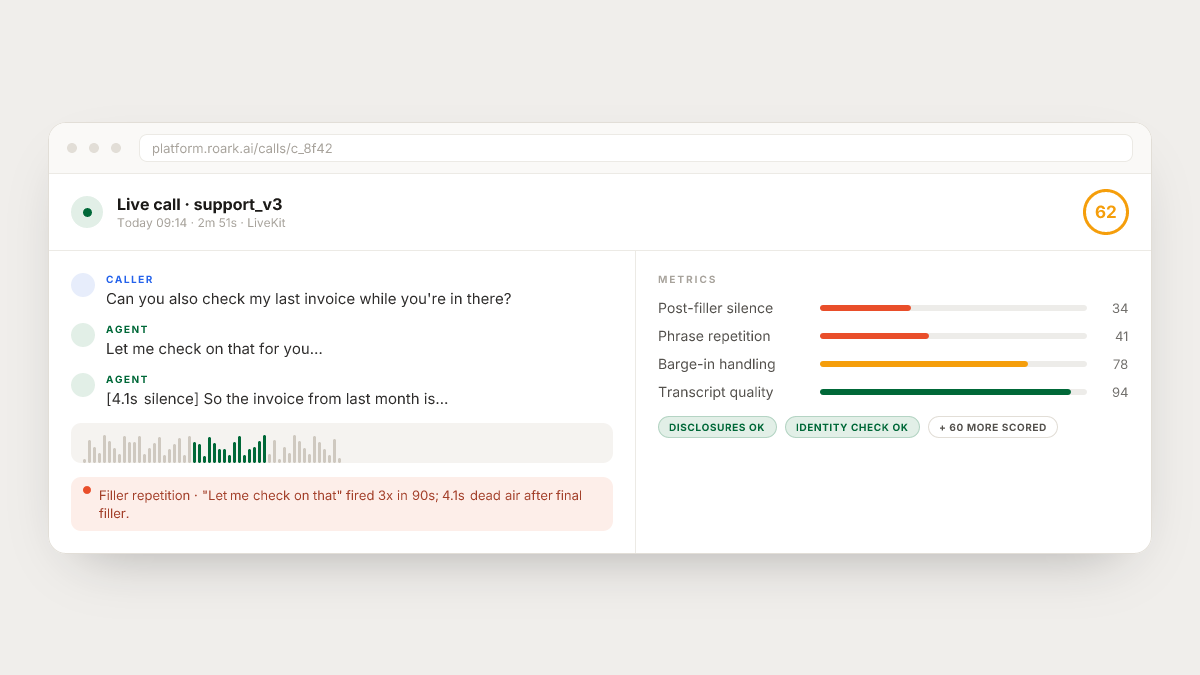
Every one of those failures is a timing failure. Picovoice groups them accurately: silent stalls, premature cutoffs, dead air, self-barge-in, and compounding latency are all timing failures, and they come from treating a voice agent as a request-response pipeline instead of an event-driven system. Timing failures don't show up in a transcript the way a hallucination does. A call where the agent said "let me check that for you" four times in ninety seconds reads perfectly fine on paper. The transcript is polite, on-topic, and coherent. The audio is unbearable.
The other trap is that filler behavior is emergent. The LLM decides to fire a filler based on the current prompt, current context, current tool schema, and current model. Swap the model, cache the prompt, tighten the schema, and the filler distribution shifts without anyone shipping a "filler change." This is the same pattern that makes latent behaviors drift when you swap providers or version-bump a TTS voice: nothing in the config changed, but the audio did.
How to actually test filler behavior
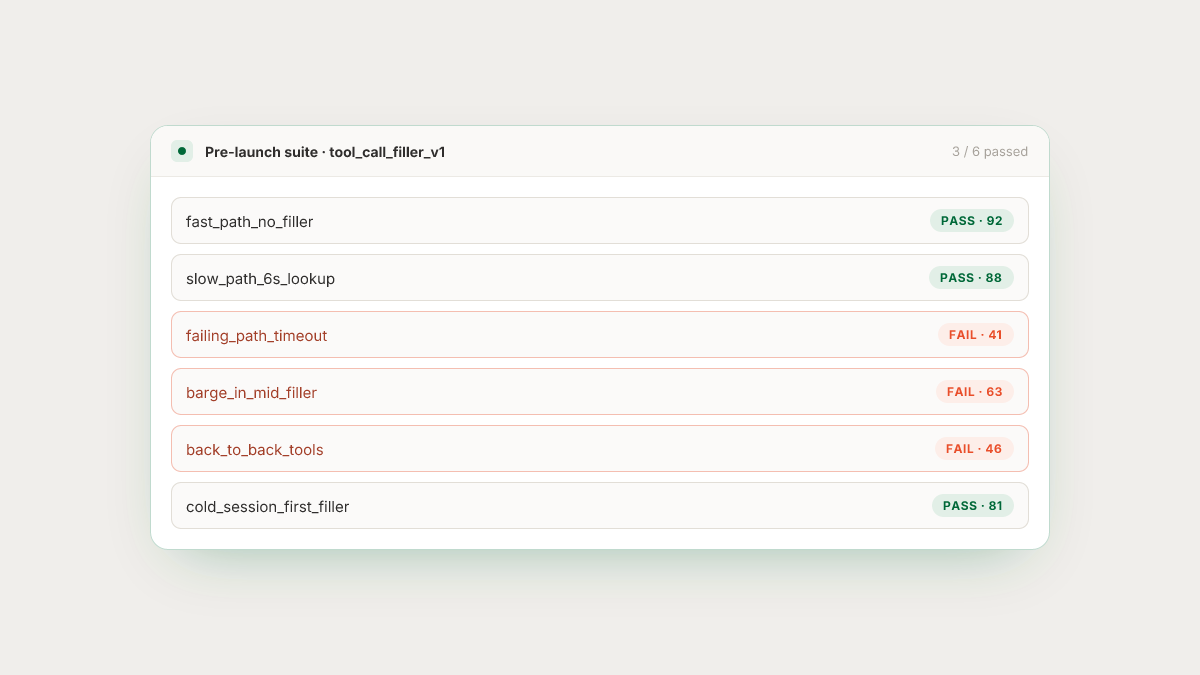
Frame it as a set of scenarios in a simulation suite that runs before every deploy. For each real tool your agent calls, generate scenarios that exercise the tail:
- Fast-path. Tool returns in 200ms. Does the filler even fire? Should it? A filler on a fast tool is a self-inflicted second of latency.
- Slow-path. Tool returns in six to eight seconds. Does the filler last long enough, or does the agent need a second utterance (progress narration) before the result arrives?
- Failing-path. Tool errors or times out. Does the agent recover with a caller-facing fallback ("I'm having trouble reaching that system, can I take your number and call you back?"), or does it stall?
- Barge-in mid-filler. Caller speaks 400ms into the filler. Does TTS cancel cleanly and the agent re-plan, or does it plough through?
- Back-to-back tool calls. Two lookups in a single turn, three in a session. Does the same phrase fire twice in twenty seconds?
- Multilingual. Persona switches language mid-call. Does the filler switch with them or does the agent code-switch back into English for four words?
- Cold session. First tool call of the day, no cache. Does the first filler stutter?
The scoring is the second half of the problem. Because the failures are audio and timing, the metrics that matter are audio-native: pause duration before the first utterance after a tool decision, silence duration after a filler ends, repetition frequency of the same phrase, interruption handling on barge-in, code-switch consistency. Word-error rate and prompt adherence miss all of them.
Where Roark fits
Roark simulates real callers over real phone calls, not a text loopback, so the tool-call timing your agent hits in production is the timing the simulation sees. Personas drive the failure surface: impatient callers barge in earlier, patient callers give the agent more rope, callers in Spanish force the language switch. Scenarios cover the slow, failing, and cold-cache paths that transcript eval can't fabricate.
Every call, live or simulated, is scored on audio-native metrics: pause length, pace, interruptions, and repetition, not just the transcript. When the same "let me check on that" fires three times in ninety seconds, or the agent goes silent for four seconds after a filler ends, Roark files that as an issue against the call instead of burying it in a dashboard someone has to read. Production call replay closes the loop: when a real caller hits a repetitive-filler collapse, you can pull that call, replay it against your patched orchestration layer, and confirm the same input no longer produces the same silence. Simulations run over the one-click Vapi, Retell, LiveKit, Pipecat, Bland, and ElevenLabs integrations, and can be triggered from CI so a prompt change that "cleaned up" a filler cannot ship without proving it didn't reintroduce dead air.
A pre-launch checklist
Before you ship an agent that depends on filler audio, work through this:
- Every slow tool has a declared latency budget and a filler policy sized to it. Filler length roughly matches expected tool duration.
- The filler library has at least six variants per language, and the orchestration layer rotates them.
- Every tool has an explicit timeout and a caller-facing recovery utterance, not just an error log.
- TTS cancellation on barge-in is tested for every filler in the library, not just the greeting.
- Multilingual coverage: no language the agent understands can produce an English-only filler.
- A simulation suite exercises fast, slow, failing, and cold-cache paths for every real tool, gated in CI.
- Audio-native metrics track pause distribution, repetition frequency, and post-filler silence per build, not just p95 latency.
The point of filler audio was never to reduce latency. It was to change what dead air felt like. When it works, callers stay on the line. When it doesn't, they don't just hear the latency you were hiding. They hear the mechanism you used to hide it, running on repeat.