
The TTS in your voice agent no longer just reads what the LLM says. On ElevenLabs v3 and v4, the model reads bracketed cues like [whispers], [excited] and [sighs] as performance direction instead of words to speak, and treats them as natural-language instructions rather than a fixed enum. Pipecat 1.15, released on October 29, generalizes the same idea across Cartesia, ElevenLabs, Fish Audio, MiniMax, Inworld, Soniox, Mistral Voxtral 3, Gemini TTS and Azure DragonHD. Your LLM is now responsible for prosody.
That shift matters for anyone who ships a voice agent. The test surface used to stop at "what did the model say." It now covers how it said it, whether the tag actually played, whether the tag leaked into the words, and whether the emotional register matched the caller. None of that shows up in a transcript. If your regressions still compare strings, you will ship an agent that giggles through a refund dispute and whispers a confirmation code the caller cannot hear.
The new test surface
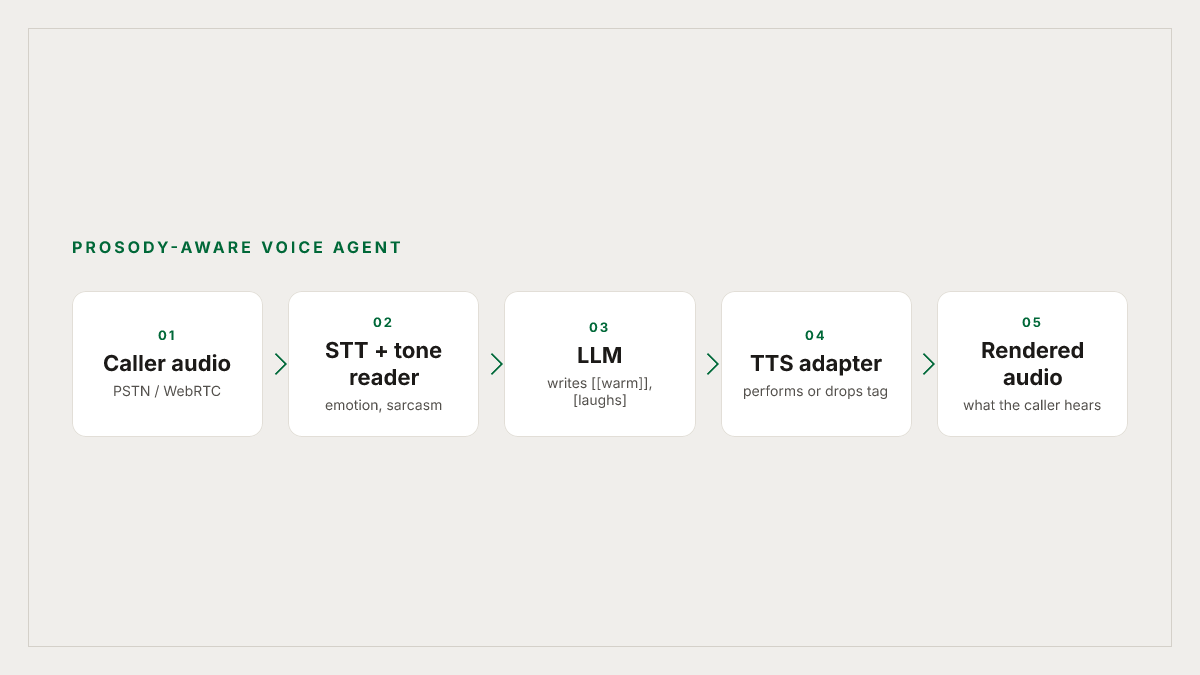
A classic cascaded voice agent has three model boundaries: STT, LLM, TTS. The LLM wrote text, the TTS read it. If you tested the text, you tested the agent.
Prosody-aware pipelines add two new pieces of state on the wire. First, upstream of the LLM, a tone reader can tag each caller turn with an emotional reading. The Pipecat Tone reader, for example, sits between STT and the user aggregator and sets a perception on each final transcription for the LLM to act on. Second, downstream of the LLM, the model writes expression markup inline, and the TTS adapter rewrites it into provider-specific tags. In Pipecat's design, universal names like <<warm>> or [[laugh]] get translated per service, so the LLM does not need to learn ElevenLabs' or Cartesia's dialect directly.
Deepgram and Pipecat formalized this handoff as the Real-Time Context Standard, an open protocol for carrying meaning like tone, speaker identity and background events between the parts of a conversational agent. The RCS exists because, as Deepgram put it, voice systems today pass words from one model to the next and lose the audio around them.
Two consequences for QA:
- Prosody is now a model output. It can be wrong the same way a tool call can be wrong.
- The ground truth lives in the audio, not the transcript. You cannot assert
response.text == "hi"and call it done.
Four failure modes you need coverage for
In the pipelines I have looked at, almost every audio-tag bug lands in one of four buckets. Testing has to catch each.
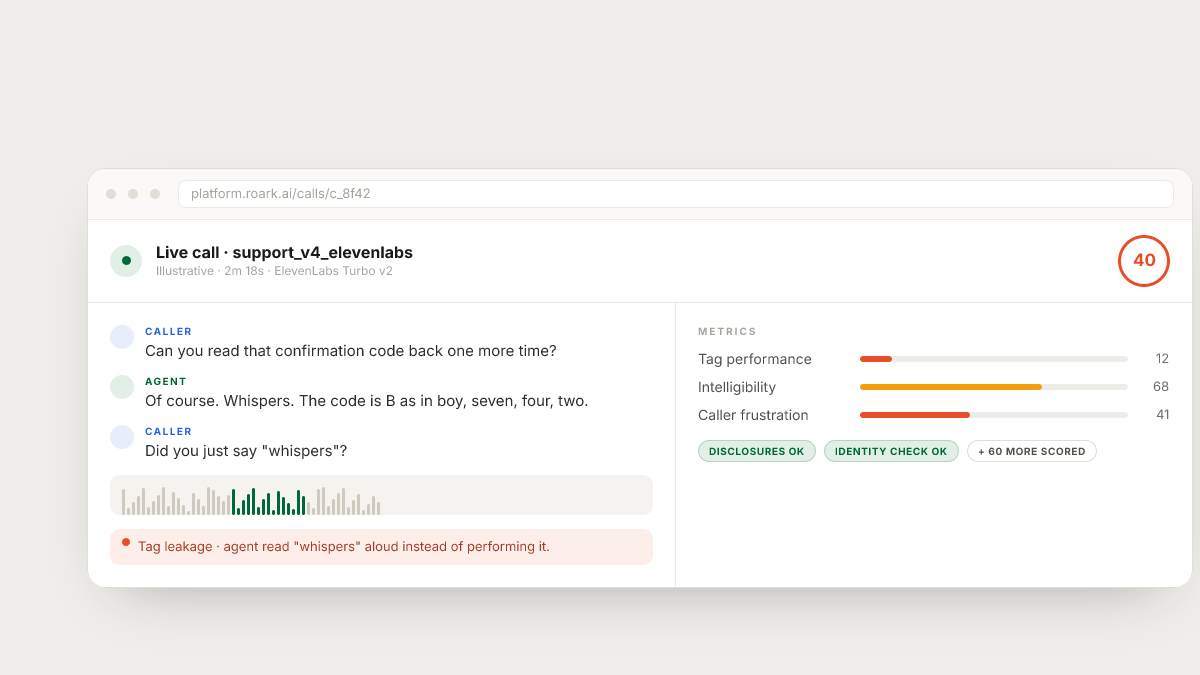
1. Tag leakage. The LLM writes [whispers] and the TTS reads it out loud. This happens when the TTS is set to a model that does not perform tags, like ElevenLabs Flash or Turbo v2, or when the adapter did not get wired for the chosen voice. ElevenLabs has been explicit that only Eleven v3 and v4, v4 Turbo included, perform audio tags, and that v3 itself is too high-latency for natural back-and-forth conversation. Any mismatch between the LLM's prompt and the TTS model id produces a caller hearing the literal word "whispers."
2. Tag inflation. The LLM over-emits tags. It wraps every sentence in [excited] or opens every reply with [laughs]. The agent sounds unhinged, but every tag is syntactically valid, so nothing throws. Pipecat's own PR notes flag a related pathology: when the LLM is given more than about fifteen Cartesia tag names, it starts inventing names of its own, which the adapter then silently drops.
3. Silent tag drops. A tag the TTS cannot perform is never reported back. The LLM wrote [sings softly] on a voice that does not do that; the TTS speaks the surrounding words flat, no error surfaces, and your observability layer has no idea the direction was ignored. Multiply across a day of calls and the "expressive" agent is anything but.
4. Tone mismatch. The tag parses, the TTS performs it, the caller hears it, and it is the wrong feeling for the moment. The agent chirps [cheerfully] through a cancellation. The caller said "my mother just passed, I need to close her account" and the tone reader flagged grief, but the LLM still opened with [warm] plus a corporate-script sentence. This is the hardest failure to catch because the audio played exactly as intended.
Simulations have to hear it
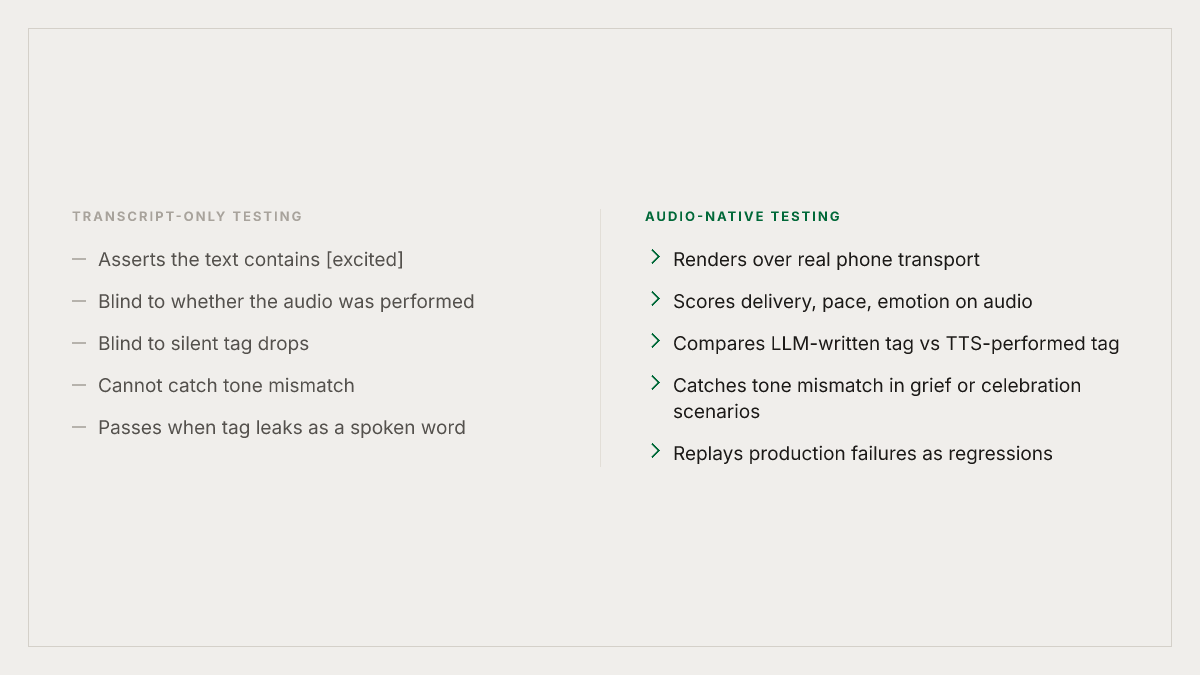
The usual way teams test this today is a text-level unit test: the response contains [excited], assert pass. That test goes green when the caller hears the word "excited" spoken out loud. A proper regression suite has to render the audio and listen to it.
Three checks are non-negotiable for any prosody-aware pipeline:
- Audio contains the performance, not the tag. The rendered waveform at the tag position should carry the acoustic signature of whispered or excited or laughing speech, and the ASR'd transcript should not contain the literal word.
- Baseline delivery outside tagged regions stays stable. A regression that cranks the whole reply into a stage-whisper after a TTS version bump is common and transcript-invisible.
- Caller-perceived tone matches scenario intent. A refund dispute should not produce an upbeat reply; a congratulatory outbound call should not produce a monotone one.
Pipecat's own eval scenarios have started to capture this: 1.15 added an expression event that reports the expression a bot's TTS actually performed, so a scenario can assert that what the LLM wrote was performed. That is the right primitive, and it only works end to end. Harnesses that stop at the LLM text frame cannot validate performance.
Scenario design: what should prompt a tag
For a technical suite, I think about audio-tag coverage the way I think about tool-call coverage. You need positive scenarios (the model should emit a tag), negative scenarios (the model should not), and a baseline (unflavored speech).
A minimum covering set for most agents:
| Scenario type | Expected tag behavior | What you assert |
|---|---|---|
| Caller is grieving or upset | Soft or warm delivery; no [cheerfully], no [laughs] | Audio-native tone score within target range; prohibited tags absent |
| Caller is celebrating | Warm or excited delivery allowed; never sarcastic | Positive-affect score above threshold; delivery changes from baseline |
| Confidence-critical read-back (code, balance) | Clear, un-styled delivery for that span | Intelligibility score; prohibited directional tags on the read-back span |
| Open neutral task ("what are your hours") | No directional tag; baseline delivery | Transcript clean; tag count near zero |
| Sarcasm or complaint ("great, another transfer") | Model acknowledges, does not match the sarcasm | Agent tone is calm, not sarcastic; caller-perceived empathy score |
| Noisy caller environment | Delivery should not drop to whisper | Minimum loudness; no [whispers] |
A few rules I follow when writing these:
- Keep the LLM prompt and the TTS model id in one config object. Most leakage bugs are an LLM prompt that assumes v3 paired with a Flash fallback voice. If one changes, fail the suite.
- Assert on both the tag the LLM wrote and the tag the TTS performed. Pipecat ships the second as a separate event for exactly this reason. Silent drops are only visible in the gap.
- Pin a tag budget per reply. If your scenario is a confirmation step, three tags in one sentence is a bug even if each tag is individually fine.
Regression after a TTS swap
This is where most teams get burned. Switching voice providers, or even model versions inside a provider, changes which tags perform, how strongly, and over what span. The Pipecat changelog notes a service without word timestamps reports each sentence in the delivery it starts in, after its sounds and pauses, which means tag alignment can shift under you on a provider change without your prompt changing one character.
A reasonable swap drill:
- Freeze a corpus of real production calls where the agent emitted tags.
- Replay those calls against the new TTS end to end over the same telephony transport.
- Diff the audio-native scores: delivery, interruption count, baseline loudness, caller-perceived empathy.
- Flag any call where the delivery category changed on the same input text, and any call where a tag silently stopped performing.
Running this by hand is painful enough that most teams do not. A regression harness that simulates real phone calls and replays production transcripts is the only way this stays sustainable.
Where Roark fits
Roark runs simulation testing over real phone calls, PSTN and WebRTC, not a text loopback. For prosody work that matters because tag leakage, inflation and silent drops only show up when the audio actually traverses your real telephony path and gets rendered by your real TTS. A text harness that mocks the TTS will pass every one of the failures above.
Roark's scoring layer is audio-native by design: the models score pronunciation, emotion, vocal stress, pace, pauses and interruptions, not just the transcript. That maps directly onto the audio-tag test surface. "Did the whisper play" and "was the reply chirpy during a grief scenario" are first-class metrics instead of hand-rolled asserts, and Roark ships 64+ built-in metrics with unlimited custom ones on top for cases your team needs to name itself.
When a prod call fails one of those checks, Roark files an issue automatically and the call becomes replayable. The production-call replay feature turns a real tag-leakage incident into a regression that runs against the next build. That is the loop you want when the LLM is the one writing prosody: every user-facing failure becomes a pinned test case.
Integrations exist for Pipecat, Vapi, Retell, LiveKit, Bland and ElevenLabs, so you can wire this into the stack you already run. For teams using Pipecat's expressive conversation, that means the same ExpressionMetadataFrame and expression event you already emit can be scored and tracked alongside the audio.
The short version: once the LLM authors prosody, prosody is in scope for regression. Test the audio, pin the tag budget, run the swap drill before every TTS version bump, and keep the production failures as replayable scenarios. Agents that sound right under load are not an accident; they are something you simulated before launch.